[An interesting snippet from my colleagues Aleksander Matrosov and Eugene Rodionov - DH]
Not so long ago, Microsoft released a security patch addressing the way Windows x64 operating systems check integrity of the loaded modules. In our recent report (The Evolution of TDL4: Conquering x64) we described a method used by the TDL4 bootkit to load its malicious unsigned driver on 64-bit systems, even though those systems have an enforced kernel-mode code signing policy. The new security update is intended to fix the “feature” (vulnerability) in x64 OS's (Windows Vista and later) exploited by TDL4.
On unpatched systems there are three BCD (Boot Configuration Data) options that determine the way the OS checks integrity of the kernel-mode modules:
- BcdLibraryBoolean_DisableIntegrityCheck – instructs the system to disable kernel-mode code integrity checks (used for debugging purposes, for instance)
- BcdOSLoaderBoolean_WinPEMode – instructs the system to disable kernel-mode code integrity checks (switched on when OS is loaded in preinstallation mode) ¬ exploited by TDL4
- BcdLibraryBoolean_AllowPrereleaseSignatures – instruct the system to use special prerelease digital certificates to verify digital signatures of kernel-mode modules.
On a patched system only two of these are left: BcdLibraryBoolean_DisableIntegrityCheck and BcdLibraryBoolean_AllowPrereleaseSignatures. BcdOSLoaderBoolean_WinPEMode BCD option is no longer used in the initialization of code integrity policy. The routine BlImgQueryCodeIntegrityBootOptions in winload.exe returns the value that determines code integrity policy. In the figure below the patched BlImgQueryCodeIntegrityBootOptions routine is presented.

Here we notice that BcdOSLoaderBoolean_WinPEMode is no longer used (as it was in the unpatched routine) and therefore TDL4’s trick of substituting kdcom.dll won’t work.
There is one mode module patched in the security update: kdcom.dll. This reinforces the conjecture that the security update specifically addresses TDL4 infection. As we already know, TDL4 replaces the kdcom.dll library with its own malicious component at boot time. The bootkit identifies kdcom.dll by the size of its export directory (it is compared with 0xFA):
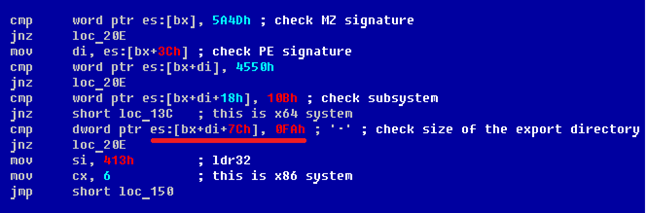
In the patched version of kdcom.dll, the size of the export directory has been changed. If we look into its export directory (figure below) we notice that an exported symbol KdReserved0 has been added which is not present in unpatched library.

This function is added with only one obvious purpose: to increase the size of the export directory and as a result prevent the TDL4 bootkit from replacing it.
The security update won’t necessarily help users who have already been infected with the bootkit as TDL4 blocks the Windows Update service on x86 machines. As a result, infected x86 machines won’t be able to download and install the patch automatically. On an x64 OS things are rather different and the Windows Update Service is not blocked by the bootkit, so the security update can be downloaded and installed.
Although the patch helps with this particular case it doesn’t solve the problem in general. There are other ways of penetrating into kernel-mode address space on x64 operating systems, for instance, as in the case of the Chinese bootkit which is detected as NSIS/TrojanClicker.Agent.BJ (VirusTotal). This uses quite a different approach to load its unsigned driver.
Eugene Rodionov, Malware Researcher
Aleksandr Matrosov, Senior Malware Researcher